
The Ultimate, Ultra-Secure AI Meeting Note-Taker
In today’s era of remote work and back-to-back virtual meetings, manual note-taking and meeting minutes management consume a massive amount of time, frequently leading to missed information. Amidst countless AI meeting tools on the market, Bluedothq (bluedothq.com) emerges as a breakthrough solution, delivering a completely unique intelligent note-taking experience.
This article provides a detailed review of the outstanding features, user experience, and incredible advantages that help Bluedothq conquer thousands of users and businesses worldwide.
1. Overview of Bluedothq
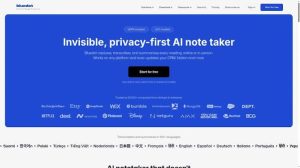
Bluedothq is an advanced technology platform specializing in AI-powered automatic meeting recording, video capture, and summarization. The biggest selling point of this platform compared to traditional tools is its bot-free operational mechanism and a philosophy that prioritizes user data privacy above all else.

2. Outstanding Advantages of Bluedothq
a. A Seamless “Bot-Free” Mechanism
Most current AI note-taking tools require you to drop an unfamiliar virtual bot account into your Google Meet, Zoom, or Microsoft Teams room, which can sometimes feel unnatural or make clients hesitant. Bluedothq completely solves this issue with independent video/audio recording technology via browser extensions or desktop apps, meaning absolute zero bots show up in your meeting room. Your meetings unfold naturally, smoothly, and professionally.
b. Cross-Platform and Flexible Ecosystem
Bluedothq doesn’t lock users down to their desktop computers. You can use it smoothly across:
-
Chrome Browser Extensions for online meetings.
-
Desktop apps (Mac, Windows) and mobile apps (iOS/Android).
-
Direct in-person meeting recording, via phone calls or Apple Watch, allowing you to digitize any discussion no matter where you are.
c. Smart AI Summarization and Multi-Language Transcription
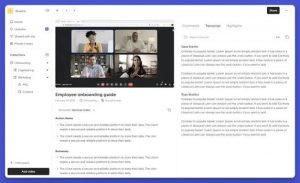
Right after a meeting ends, Bluedothq automatically converts speech into high-accuracy text (Transcription) supporting over 100 languages. The AI system automatically condenses this into a concise summary, clearly extracting crucial decisions and action items, saving you 100% of the time spent writing minutes.
d. Interactive AI Chat with Meeting Data
This is one of Bluedothq’s smartest features. Instead of reading through a lengthy transcript, you can chat directly with the AI (e.g., asking “What did the client complain about regarding the checkout feature yesterday?”). The AI scans the database and responds accurately based on the prior meeting’s context, making information retrieval as easy as messaging a colleague.
e. Smooth Workflow Automations (Integrations)
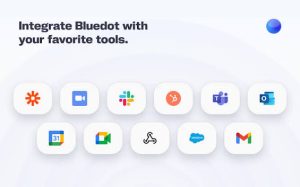
Bluedothq understands that your time is valuable. The tool integrates seamlessly with popular enterprise management software like HubSpot, Salesforce, Notion, and Slack. All customer details from sales calls or candidate info from interviews automatically sync to your CRM without manual data entry.
f. Enterprise-Grade Security (Privacy-First)
For businesses, data security is priority number one. Bluedothq commits to strict security with end-to-end data encryption, ensuring all sensitive information from internal meetings or partner negotiations remains completely confidential.
3. Conclusion: Should You Use Bluedothq?
Overall Rating: 4.9 / 5 stars.
If you are a busy manager, a sales professional closing deals constantly, a recruiter interviewing candidates daily, or simply someone looking to optimize personal productivity, Bluedothq is undoubtedly a smart and worthwhile investment. The perfect combination of bot-free technology, intelligent AI, and high security will completely free you from tedious manual note-taking.
Bluedothq Platforms
 Web
Web iOS
iOS Android
 Chrome Extension